Some days back I have a Requirement of making Custom checkbox of Language like showing below.

There are some values of Language as shown above.and there is one more checkbox called Other and when i click check on Other Checkbox the Textbox value of Other will be visible.and you can specify the Other Language value.and if you uncheck the Other checkbox the Textbox of Other will be disappear.
First DownLoad this two Javascript and Add this two in Form Properties.
CheckboxJavascript Function
///<reference path="..\IntelliSense\XrmPage-vsdoc.js"/>
if (typeof (OptionSetToMultiSelect) == "undefined")
{ OptionSetToMultiSelect = {}; }
OptionSetToMultiSelect.Functions = {
ToMultiSelect: function (var_sc_optionset, var_sc_optionsetvalue, required, columns) {
var OS = document.getElementById(var_sc_optionset);
var OSV = document.getElementById(var_sc_optionsetvalue);
if (OS != null && OSV != null) {
if (columns == null)
columns = 1;
OS.style.display = "none";
if (required) {
OS.parentNode.parentNode.firstChild.appendChild(document.createElement('<IMG class=ms-crm-ImageStrip-frm_required alt=Required src="/_imgs/imagestrips/transparent_spacer.gif?ver=-137896071">'));
}
OSV.parentNode.parentNode.style.display = 'none'
// Create a DIV container
var divHight = (OS.options.length > 4 ? 25 : (OS.options.length - 1 * 20)) + 30;
var addDiv = document.createElement("<div style='overflow-y:auto; height:" + divHight + "px; border:1px #cecece solid;' />");
OS.parentNode.appendChild(addDiv);
var count = 0;
var totalPerColumn = (OS.options.length - 1) / columns;
OS.nextSibling.appendChild(document.createElement("<div style='width:25;float:left;' />"))
// Initialise checkbox controls
for (var i = 1; i < OS.options.length; i++) {
var pOption = OS.options[i];
if (!OptionSetToMultiSelect.Functions.IsChecked(pOption.text, OS, OSV))
var addInput = document.createElement("<input type='checkbox' id='" + var_sc_optionset + "_custom' style='border:none; width:25px; align:left;' value='" + pOption.text + "' />");
else
var addInput = document.createElement("<input type='checkbox' id='" + var_sc_optionset + "_custom' checked='checked' style='border:none; width:25px; align:left;' value='" + pOption.text + "' />");
addInput.onclick = function () {
var valuesField = Xrm.Page.getAttribute(var_sc_optionsetvalue);
var customFields = OS.nextSibling.getElementsByTagName("input");
var values = "";
for (var j = 0; j < customFields.length; j++) {
if (customFields[j].checked) {
values += customFields[j].value;
values += ";"
}
}
values = values.substring(0, values.length - 1);
valuesField.setValue(values);
EnableOtherLanguageText();
};
var label = document.createElement("<label style='width:100px' />");
label.appendChild(addInput)
var labelText = document.createElement("<span style='white-space:nowrap;'/>");
labelText.innerText = pOption.text;
label.appendChild(labelText)
if (count >= totalPerColumn) {
OS.nextSibling.appendChild(document.createElement("<div style='width:70px;float:left;' />"))
count = 0;
}
OS.nextSibling.lastChild.appendChild(label);
count++;
}
if (required) {
OptionSetToMultiSelect.Functions.OptionSetToMultiSelectRequiredFields.push(var_sc_optionsetvalue);
}
}
},
// Check if it is selected
IsChecked: function (pText, OS, OSV) {
if (OSV.value != "") {
var OSVT = OSV.value.split(";");
for (var i = 0; i < OSVT.length; i++) {
if (OSVT[i] == pText)
return true;
}
}
return false;
},
// Save the selected text, this field can also be used in Advanced Find
OnSave: function (var_sc_optionsetvalue, var_sc_optionset, required) {
//save value
control = Xrm.Page.getControl(var_sc_optionsetvalue);
valueControl = Xrm.Page.getControl(var_sc_optionsetvalue).getAttribute()
if (required && valueControl.getValue() == null) {
alert("You must provide a value for " + var_sc_optionset);
event.returnValue = false;
return false;
}
},
CheckAllMultiCheckboxWithLayersRequiredFields: function () {
for (var i = 0; i < OptionSetToMultiSelect.Functions.OptionSetToMultiSelectRequiredFields.length; i++) {
var valueControl = Xrm.Page.getControl(OptionSetToMultiSelect.Functions.OptionSetToMultiSelectRequiredFields[i]);
var isDisabled = valueControl.getDisabled();
if (valueControl.getAttribute().getValue() == null && !isDisabled) {
alert("You must provide a value for " + valueControl.getLabel().replace("Values", ""));
OptionSetToMultiSelect.Functions.OptionSetToMultiSelectValidationTriggered = true;
event.returnValue = false;
return false;
}
}
},
OptionSetToMultiSelectRequiredFields: new Array(),
OptionSetToMultiSelectValidationTriggered: false
}
EnableOther Language Function
function EnableOtherLanguageText(){
var LanguageValue=Xrm.Page.data.entity.attributes.get("new_languagevalue").getValue();
var OtherText = Xrm.Page.ui.controls.get("new_other");
var SetText = Xrm.Page.data.entity.attributes.get("new_other");
if(LanguageValue != null && LanguageValue != '')
{
if (LanguageValue.indexOf("Other") !=-1) {
OtherText.setVisible(true);
}
else
{
SetText.setValue('');
OtherText.setVisible(false);
}
}
else
{
SetText.setValue('');
OtherText.setVisible(false);
}
}
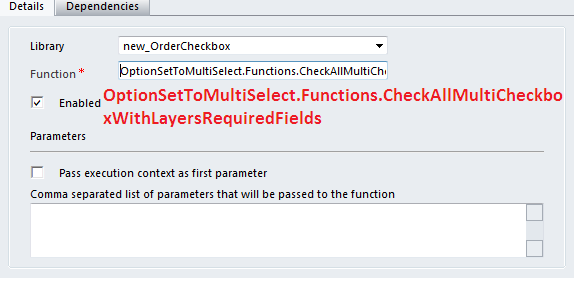
Now Add Two Function in Form Onload and One Function in OnSave event of Form as Shown in Below.
Form On load Event

Form On Save Event

Set Function Name